The built-in leaderboard automatically displays values under the leaderstats folder in each player's data.
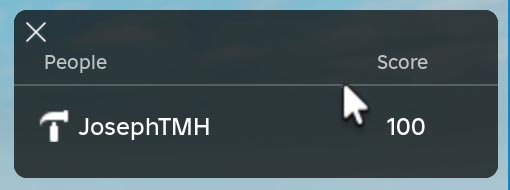
Roblox Studio
Setting Up the Leaderboard
game.Players.PlayerAdded:Connect(function(player)
    -- Create a leaderstats folder
    local leaderstats = Instance.new("Folder")
    leaderstats.Name = "leaderstats"
    leaderstats.Parent = player

    -- Create a score value inside leaderstats
    local score = Instance.new("IntValue")
    score.Name = "Score"
    score.Value = 0  -- Initial score
    score.Parent = leaderstats
end)
Updating the Leaderboard
local function updatePlayerScore(player, scoreIncrement)
	-- Update the score in leaderstats
	player.leaderstats.Score.Value = player.leaderstats.Score.Value + scoreIncrement

	-- Print confirmation
	print("Player score updated for player: " .. player.Name)
end


game.Players.PlayerAdded:Connect(function(player)
	-- Create a leaderstats folder
	local leaderstats = Instance.new("Folder")
	leaderstats.Name = "leaderstats"
	leaderstats.Parent = player

	-- Create a score value inside leaderstats
	local score = Instance.new("IntValue")
	score.Name = "Score"
	score.Value = 100  -- Initial score
	score.Parent = leaderstats

	wait(3)
	updatePlayerScore(player, 10)
end)
Custom Leaderboard UI
local Players = game:GetService("Players")
local Teams = game:GetService("Teams")

local function createLeaderboardGui(player)
	local leaderboardGui = Instance.new("ScreenGui")
	local leaderboardFrame = Instance.new("Frame")

	leaderboardGui.Name = "CustomLeaderboard"
	leaderboardGui.Parent = player:WaitForChild("PlayerGui")

	leaderboardFrame.Size = UDim2.new(0.3, 0, 0.4, 0)
	leaderboardFrame.Position = UDim2.new(0.7, 0, 0.05, 0) -- Top-right corner
	leaderboardFrame.BackgroundColor3 = Color3.fromRGB(255, 165, 0) -- Orange background
	leaderboardFrame.BorderSizePixel = 0
	leaderboardFrame.Parent = leaderboardGui
	return leaderboardFrame
end

local function updateLeaderboard(leaderboardFrame)
	leaderboardFrame:ClearAllChildren()
	local players = Players:GetPlayers()
	table.sort(players, function(a, b)
		return a.leaderstats.Score.Value > b.leaderstats.Score.Value
	end)

	for rank, player in ipairs(players) do
		local playerLabel = Instance.new("TextLabel")
		playerLabel.Size = UDim2.new(1, 0, 0, 30)
		playerLabel.Position = UDim2.new(0, 0, 0, (rank - 1) * 30)
		playerLabel.BackgroundTransparency = 1 -- Transparent background for the text labels
		playerLabel.TextColor3 = Color3.new(1, 1, 1) -- White text
		playerLabel.Text = rank .. ". " .. player.Name .. " - " .. player.leaderstats.Score.Value .. " points"
		playerLabel.Parent = leaderboardFrame
	end
end

local leaderboardFrame = createLeaderboardGui(Players.LocalPlayer)

while true do
	updateLeaderboard(leaderboardFrame)
	wait(10)
end
Roblox Studio
